

Reprice delivery
Shopify prices a subscription’s delivery once, at checkout, and keeps charging that price. If your rates go by weight or order value, that’s wrong as soon as an order changes:
- A customer skips half their box, but still pays delivery for a full one.
- A customer adds a one off that tips the box into the next weight band, but pays the lighter price.
- A customer adds a product to their subscription for good, and every order after that pays the old, lighter price.
Reprice delivery fixes that. Gro asks Shopify what delivery costs for exactly what’s in each order, and charges that. When the subscription itself changes, its regular delivery price is updated too.
There are two prices to keep in mind:
- The regular delivery price is for the subscription’s normal box. Every order charges it unless that order is different.
- A one order price applies when the next order has skipped items or one offs in it. After that order, delivery goes back to the regular price.
Turning it on
Section titled “Turning it on”Go to Settings → Subscriptions → Billing & contracts and turn on Reprice delivery. It’s off until you turn it on, and it applies to every subscription in your store.
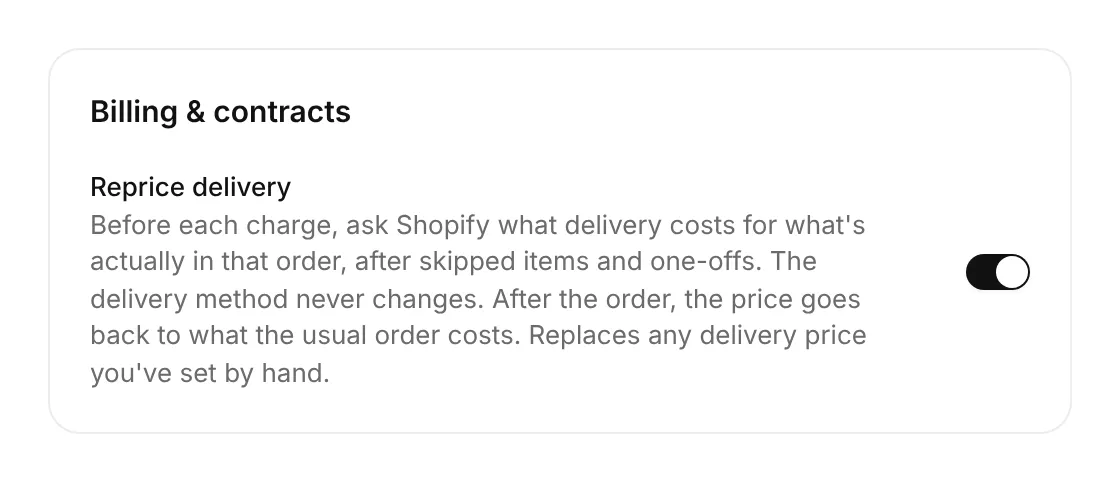
Turn it off at any time. Orders already being charged finish at the price they were given, and delivery goes back to the regular price afterwards.
When Gro reprices
Section titled “When Gro reprices”| When | What happens |
|---|---|
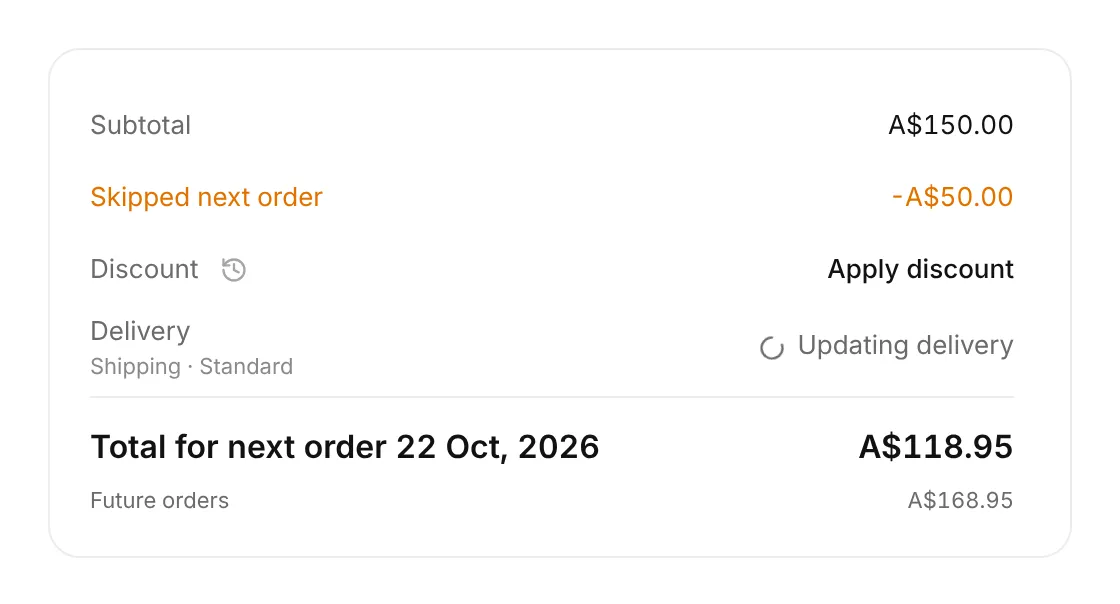
| A customer or you skip an item or add a one off to the next order, including free gifts from rewards | Gro checks that order’s delivery price with Shopify in the background. The change happens straight away, and the delivery row shows Updating delivery for a few seconds until the new price and total appear. The regular price doesn’t change. |
| A customer or you change the subscription for good (add, remove or swap a product, change a quantity or box selection, change the address) | As soon as the change is saved, Gro updates the regular delivery price in the background, whoever made the change and wherever, even if they close the page straight away. If the subscription is open, the delivery row shows Updating delivery for a few seconds, then the new price, which every future order charges. |
| Two days before billing, when the payment reminder goes out | Gro makes sure the price in the reminder is for the order as it stands, checking with Shopify again if it changed. |
| Just before the charge | Gro asks Shopify one last time for exactly what’s in the order, and that’s the price charged. This is the price that counts. |
| Payment retries | Each retry reprices again, so it follows any change to your Shopify rates. |
| After the order (charged, or dropped because the subscription was paused, cancelled or skipped while a payment was failing, or you cleared a held order) | Skipped items go back on, one offs come off, and delivery goes back to the regular price. |
Once it’s back, the delivery row shows this order’s price, with what future orders cost underneath:
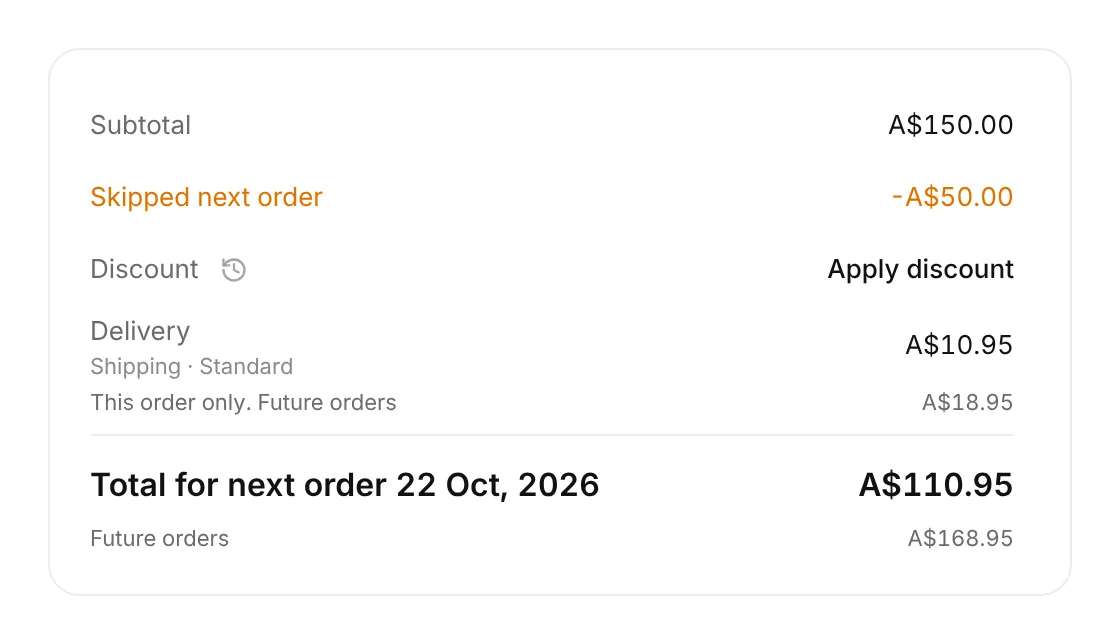
Customers see the same in their portal, and the amount in the payment reminder matches it.
An example
Section titled “An example”With Standard at A$10.95 up to 0.5kg and A$18.95 from 1kg to 3kg:
- A customer’s box weighs 1.2kg, so their regular delivery price is A$18.95.
- They skip items weighing 0.8kg. A few seconds later their portal shows delivery at A$10.95 for that order.
- That order is charged A$10.95 for delivery.
- The skipped items come back for the next order, and delivery goes back to A$18.95.
Which price it picks
Section titled “Which price it picks”- The delivery method never changes. Shipping stays shipping and local delivery stays local delivery, and the service the customer chose stays the same. Only the price moves. To move a customer to a different method or service, use Change delivery method.
- Same service first. A customer on Standard gets Standard’s price for the new order.
- If that service isn’t offered for the new order, they’re charged the cheapest price on the same method. Their subscription stays on its own service, only the price changes. For example, a customer on Express whose box is now too heavy for Express stays on Express, and that order is charged Standard’s price.
- If the method isn’t offered at all, the price stays as it is.
The prices come from your Shopify shipping settings, so to change what’s charged, change your rates in Shopify.
What you control
Section titled “What you control”- On or off, for the whole store. The switch above. There’s no per subscription switch.
- Your rates. Gro never invents a price. It charges what your Shopify shipping settings quote.
- Prices set by hand. While the setting is on, a delivery price you type in (with Edit delivery amount, or the price in Change delivery method) is replaced by Shopify’s price at the next charge. To keep a custom price, leave the setting off.
- Free delivery. Give the subscription a free delivery discount. Subscriptions with one are never repriced, so delivery stays free.
Customers can’t change delivery prices. They only see the new price when they change their order.
When it doesn’t reprice
Section titled “When it doesn’t reprice”- Pickup subscriptions.
- Subscriptions with a free delivery discount.
- Subscriptions whose method shows Not synced. They’re repriced once it fills in.
- If Shopify doesn’t answer, the order is charged at the current price, and the next order page shows the current price. Repricing never holds up a skip, a page or a charge.
Where you see changes
Section titled “Where you see changes”- Activity: every change is logged on the subscription as Delivery repriced, with the old and new price and whether it was for one order or for future orders.
- Flows and emails: subscription events include the next order’s delivery price, and Payment success includes the amount the order charged and the delivery it charged.
Good to know
Section titled “Good to know”- Checking a one order price never changes the subscription. Gro prices a temporary copy of the order and throws it away. Only a change to the subscription itself updates its regular delivery price.
- Several quick changes, like skipping three items in a row, make one check, not three.
- Changing a delivery date or frequency doesn’t reprice. Only what’s in the box, the delivery method and the address do.
- Opening a subscription never triggers a check on its own. Updating delivery only shows when something changed.
- The price shown before billing is Gro’s best answer at the time. If your Shopify rates change between then and the charge, the charge uses the new rates.