
Simulate flows
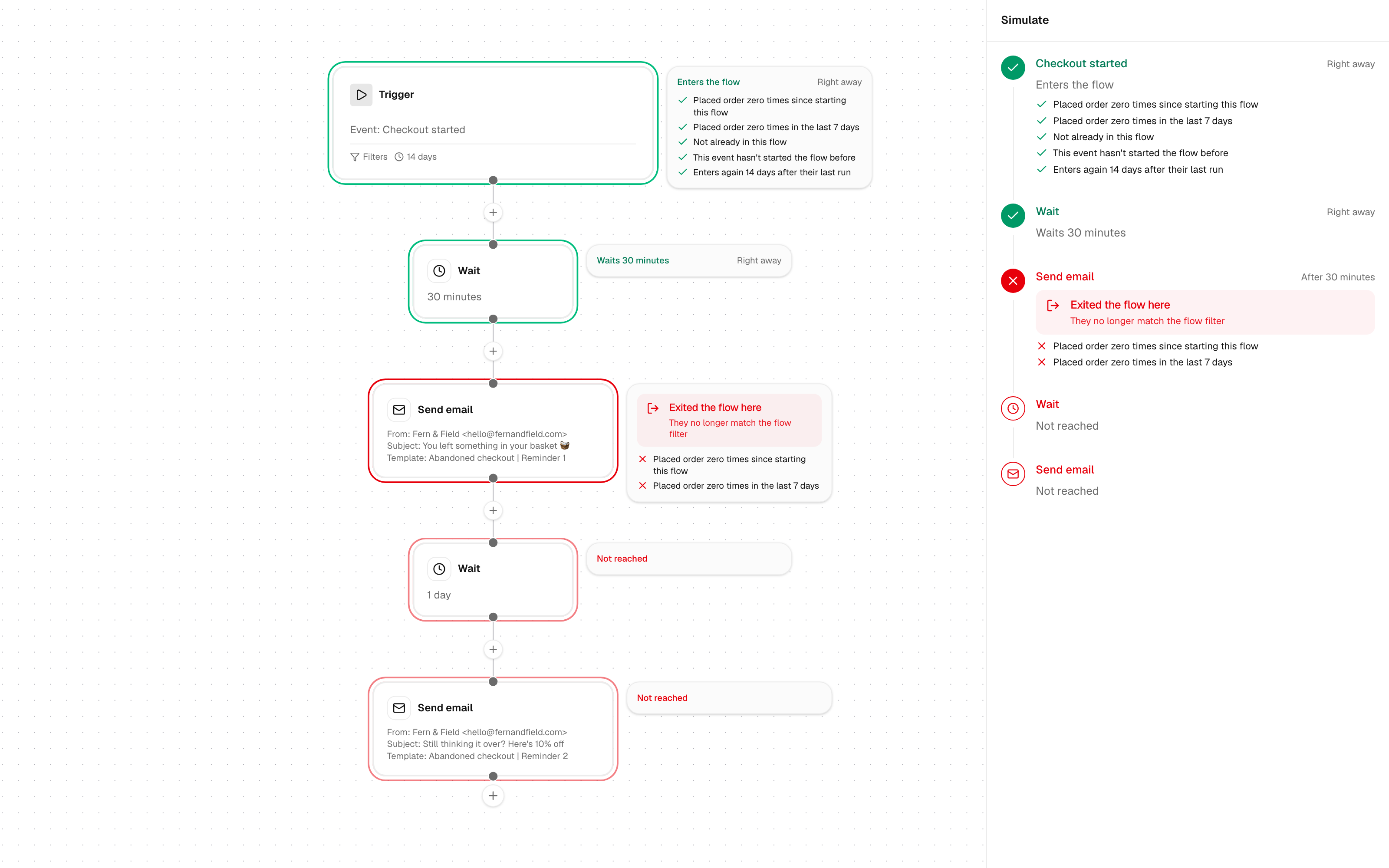
“Why didn’t she get the email?” now has a straight answer. Pick a customer, click Simulate, and Gro walks them through the flow using their real data, without sending a thing.
See it on the flow
- Green steps they get through, with a card saying what happens and when.
- Red where they stop, with a clear alert: They don’t enter this flow or Exited the flow here.
- Not reached on every step after that, so you can see what they miss.
- Every rule ticked or crossed, so you know exactly which one made the difference.
The same run shows as a timeline in the Simulate panel, and you can open any email to see it as that customer would get it.
Replay what really happened
Pick one of their past events and Simulate checks each step against their data as it stood at that moment. Waits move the clock forward, so a customer who bought 20 minutes into an abandoned checkout flow shows leaving at the right step.
Use it to
- Check a new flow before you switch it on.
- Answer support questions like “why did I get this?” or “why didn’t I?”
- Test your filters, like “Placed order zero times since starting this flow”, on real customers.
You can also ask Gro Agent “Would Jane get the welcome flow?” and get the same walk through in chat.
 ChatGPT
 Claude
 Perplexity
 Grok